TigerBeetle operations
Execute supported TigerBeetle operations through the API or query explorer.
Parix exposes a deliberately bounded TigerBeetle integration surface through one versioned route:
POST /api/v1/databases/{databaseId}/tb/{operation}Every request is authenticated, checked against the database boundary, validated, and sent through the Parix gateway for the database's provider deployment. Applications do not connect directly to replica addresses.
Use the live OpenAPI document for complete field schemas. This page explains how the operations behave and how to choose between the API and the browser query explorer.
Prerequisites
Before executing an operation:
- Call
GET /api/v1/sessionto confirm the credential's organization, scopes, and database boundary. - Call
GET /api/v1/databases/{databaseId}and confirm that the database profile is active. - Use the database UUID in the path. Dashboard routes may display a database name, but API routes require the UUID.
- Send
content-type: application/jsonand one authentication header.
Specific-database API keys work only for the database to which they are bound. See API and OpenAPI for credential behavior and lifecycle endpoints.
Supported operations
| Operation | Access | Request payload | Typical result |
|---|---|---|---|
create_accounts | db:write | Array of 1–8190 account objects | Per-batch TigerBeetle create result |
create_transfers | db:write | Array of 1–8190 transfer objects | Per-batch TigerBeetle create result |
lookup_accounts | db:read | Array of 1–8190 account IDs | Matching accounts |
lookup_transfers | db:read | Array of 1–8190 transfer IDs | Matching transfers |
get_account_transfers | db:read | Account filter with account_id and limit | Transfers for the account |
get_account_balances | db:read | Account filter with account_id and limit | Historical balances for the account |
query_accounts | db:read | Query filter with limit | Accounts matching the filter |
query_transfers | db:read | Query filter with limit | Transfers matching the filter |
The two create operations are writes. The other six are reads. A token must carry the corresponding scope; API keys carry both scopes but remain constrained by their configured database boundary.
JSON and numeric conventions
TigerBeetle identifiers, amounts, and aggregate counters can exceed JavaScript's safe integer range. Send integer-like values as decimal strings in JSON:
{
  "id": "1701411834604692317316873037158841057",
  "amount": "1000000"
}
This avoids precision loss before the request reaches Parix. Codes are unsigned 16-bit integers (0–65535), and ledgers are unsigned 32-bit integers (0–4294967295).
Payload objects are strict: unknown fields are rejected rather than silently ignored. The important boundaries are:
- account objects require
id,ledger, andcode; - transfer objects require
id,debit_account_id,credit_account_id,amount,ledger, andcode; - account history filters require
account_idandlimit; - account and transfer query filters require
limit; - optional query fields include ledger, code, user-data fields, timestamp bounds, and flags; and
- create and lookup batches must contain at least one item and at most 8190 items.
Optional account fields include debit/credit aggregates, user-data fields, flags, reserved data, and timestamp. Optional transfer fields include pending_id, user-data fields, timeout, flags, and timestamp. Consult the current OpenAPI schema before serializing them; do not copy an account response wholesale into a create request.
Execute a read
Query up to 100 accounts:
curl -X POST \
  "$PARIX_BASE_URL/api/v1/databases/$DATABASE_ID/tb/query_accounts" \
  -H "content-type: application/json" \
  -H "x-api-key: $PARIX_API_KEY" \
  -d '{"ledger":1,"limit":100}'
Shared Developer queries require a ledger; replace 1 with a ledger used by that project. A dedicated database can omit the ledger to query across its allowed scope. An empty responsePayload is a successful result: the database was reachable, but no rows matched the filter. It should not be treated as a connection failure.
Look up known account IDs by sending an array:
curl -X POST \
  "$PARIX_BASE_URL/api/v1/databases/$DATABASE_ID/tb/lookup_accounts" \
  -H "content-type: application/json" \
  -H "x-api-key: $PARIX_API_KEY" \
  -d '["1001", "1002"]'
Execute a write
Create requests are always batches, even when creating one object:
curl -X POST \
  "$PARIX_BASE_URL/api/v1/databases/$DATABASE_ID/tb/create_accounts" \
  -H "content-type: application/json" \
  -H "x-api-key: $PARIX_API_KEY" \
  -d '[
    {
      "id": "1001",
      "ledger": 1,
      "code": 1
    }
  ]'
Choose stable, unique IDs in the calling application. If the HTTP outcome is ambiguous, preserve the submitted IDs and look them up before deciding whether another write is appropriate. Generating replacement IDs can turn an uncertain retry into a duplicate business event.
Map write conflicts to input items
When TigerBeetle rejects one or more create items, the API returns HTTP 409 Problem Details with a tbResults array:
{
  "title": "Conflict",
  "status": 409,
  "detail": "...",
  "tbResults": [{ "index": 0, "result": "..." }]
}
index is the zero-based position in the submitted batch. Retain that ordering until you have associated every returned result with its source account or transfer. Do not retry the entire batch without first interpreting the per-item results.
Read the response envelope
A successful operation response includes both the application result and routing context. Fields include:
databaseId,databaseName, andclusterId;operationand a human-readableoperationLabel;requestPayloadandresponsePayload;- provider, target host, mode, and replica count;
persisted,message, and a documentation URL.
Treat responsePayload as the TigerBeetle result for application logic. The other fields are useful when correlating a request with database configuration or a support case. Do not expose target or request details in public logs.
Validation errors use HTTP 400 Problem Details with errors or fieldErrors. Authentication, authorization, plan, quota, and placement failures use the same status model described in API and OpenAPI.
Shared Developer limits
Shared Developer databases support the query and gateway surface, but each request is also checked against the plan's current rate, account, transfer, pending-transfer, read, and placement limits. The limits are configuration-driven; use the dashboard and API error body as the current source of truth rather than hard-coding numbers in your client.
Relevant responses include:
402when the required Developer subscription is not usable;429when a request, monthly, or lifetime plan limit is reached; and503when the shared cell is not assigned or cannot admit the operation.
Do not treat these as malformed TigerBeetle payloads. Preserve the Problem Details body and follow its message.
Use the query explorer
Open the selected database and choose Query to exercise the same eight operation families with your signed-in browser session. The explorer defaults to Query accounts with a limit of 100 and provides:
- generated IDs for create forms;
- required-field validation and advanced fields/flags;
- a result grid with request duration and status; and
- structured error details when an operation fails.
On a shared database, account and transfer queries can target one known ledger or All known ledgers. The all-ledgers choice fans out across the ledger values known to the shared project and combines the results. When no ledgers are known yet, an empty result is expected.
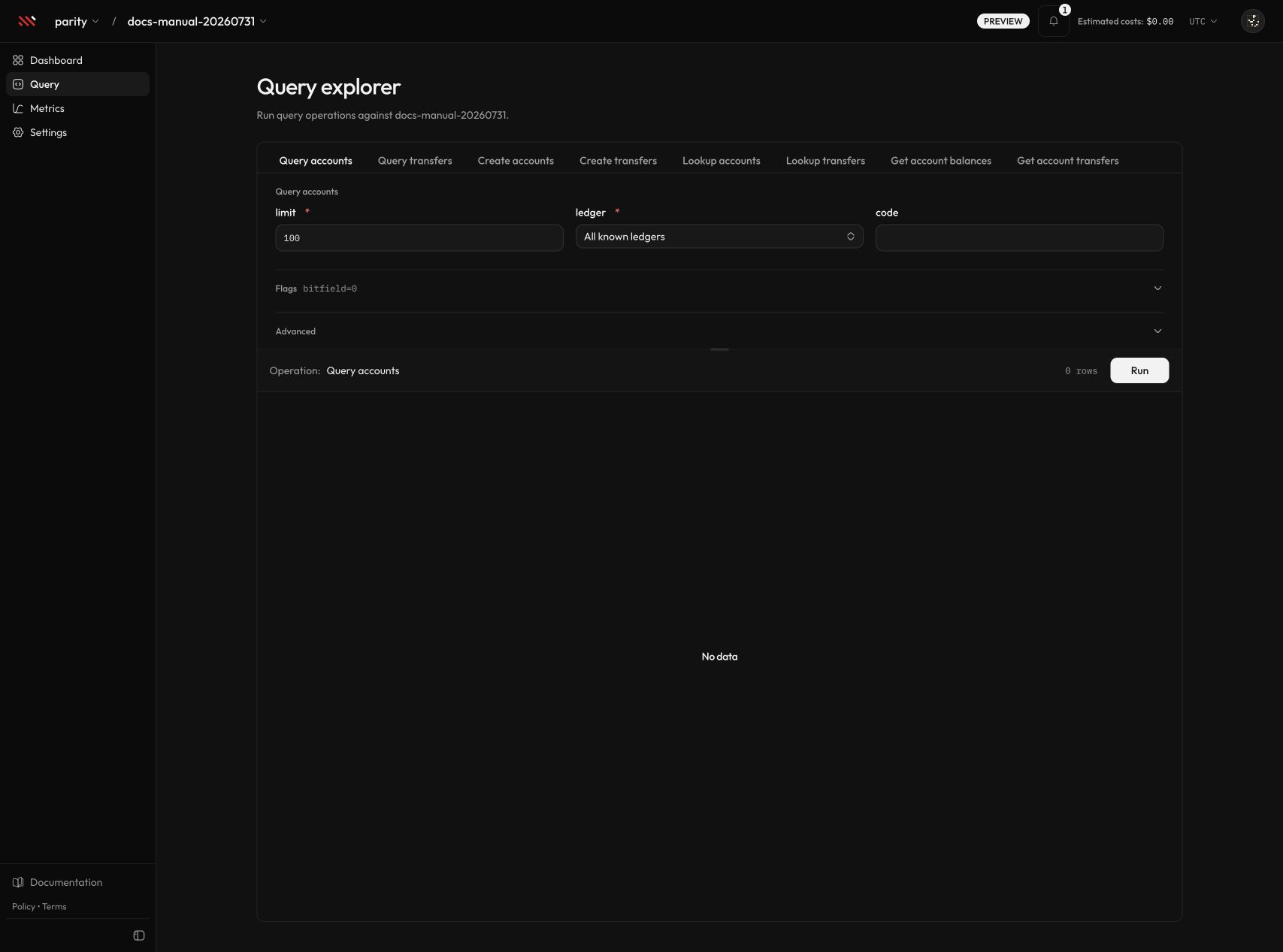
Query accounts, adjust the ledger and limit, then select Run. Select the image to open it at full size.
Use a read operation as the first connectivity smoke test. After it succeeds, choose a create operation, review the generated ID and required ledger/code values, and run the write intentionally.
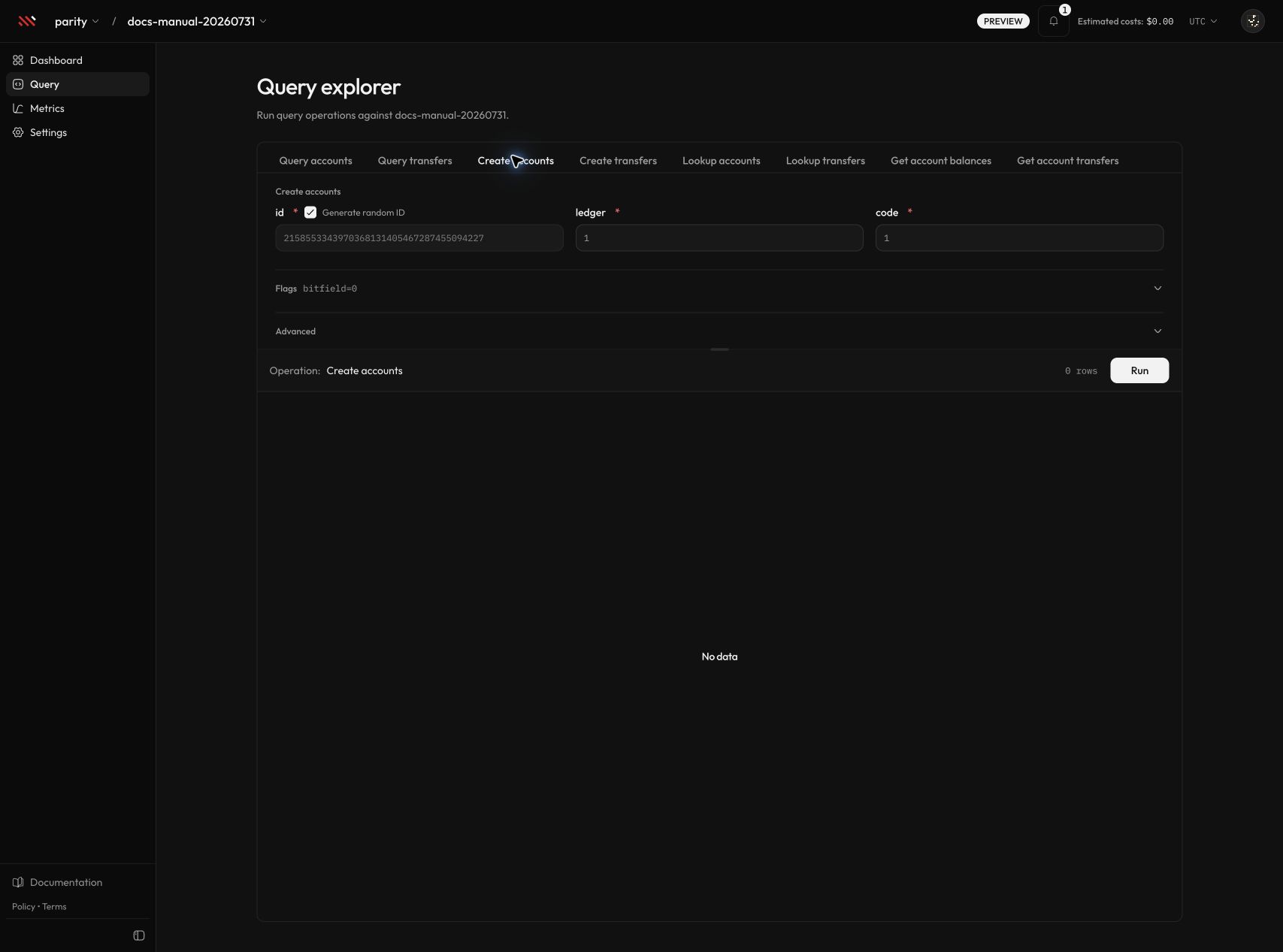
Create accounts uses the same validated payload contract as the API. Select the image to open it at full size.
The explorer is an operator tool, not an application credential. Production applications should use the API and keep their API key or access token in server-side secret storage.