Create a database
Provision an empty Developer, Dedicated, or Production database from the Parix dashboard.
Use this guide to provision a new empty TigerBeetle database. The dashboard is the supported creation path for every self-service plan and shows the catalog choices, billing state, shared capacity, and estimated monthly price before you submit.
Availability and prerequisites
You need a Parix account, an active organization, and a unique database name of 1–40 characters.
| Plan | Deployment and intended use | Creation requirements |
|---|---|---|
| Developer | Shared Parix cell for learning, prototypes, and SDK testing. No production SLA. | Verified email and available shared placement. The first eligible database is complimentary for the user’s lifetime; additional Developer databases require billing. |
| Dedicated | Isolated single-node deployment for development, staging, and other non-HA workloads. | Usable Stripe billing and an available catalog selection. |
| Production | Isolated 3- or 6-replica high-availability deployment. | Usable Stripe billing and an available catalog selection. |
The dashboard catalog is authoritative. Providers, regions, topology variants, storage tiers, storage sizes, and PX sizes can differ by environment and current infrastructure availability.
An organization owner or administrator can link or repair Stripe billing. Other organization members can submit a create only after billing is ready.
Create from the dashboard
- Open the organization database list at
/{organizationSlug}. - Select New database, then New database.
- Confirm that Mode is New Database.
- Choose a plan:
- Choose Developer for a shared database.
- Choose Dedicated for one isolated node.
- Choose Production for a 3- or 6-replica isolated cluster.
- Choose the organization and enter the Database Name. The name must be unique inside that organization.
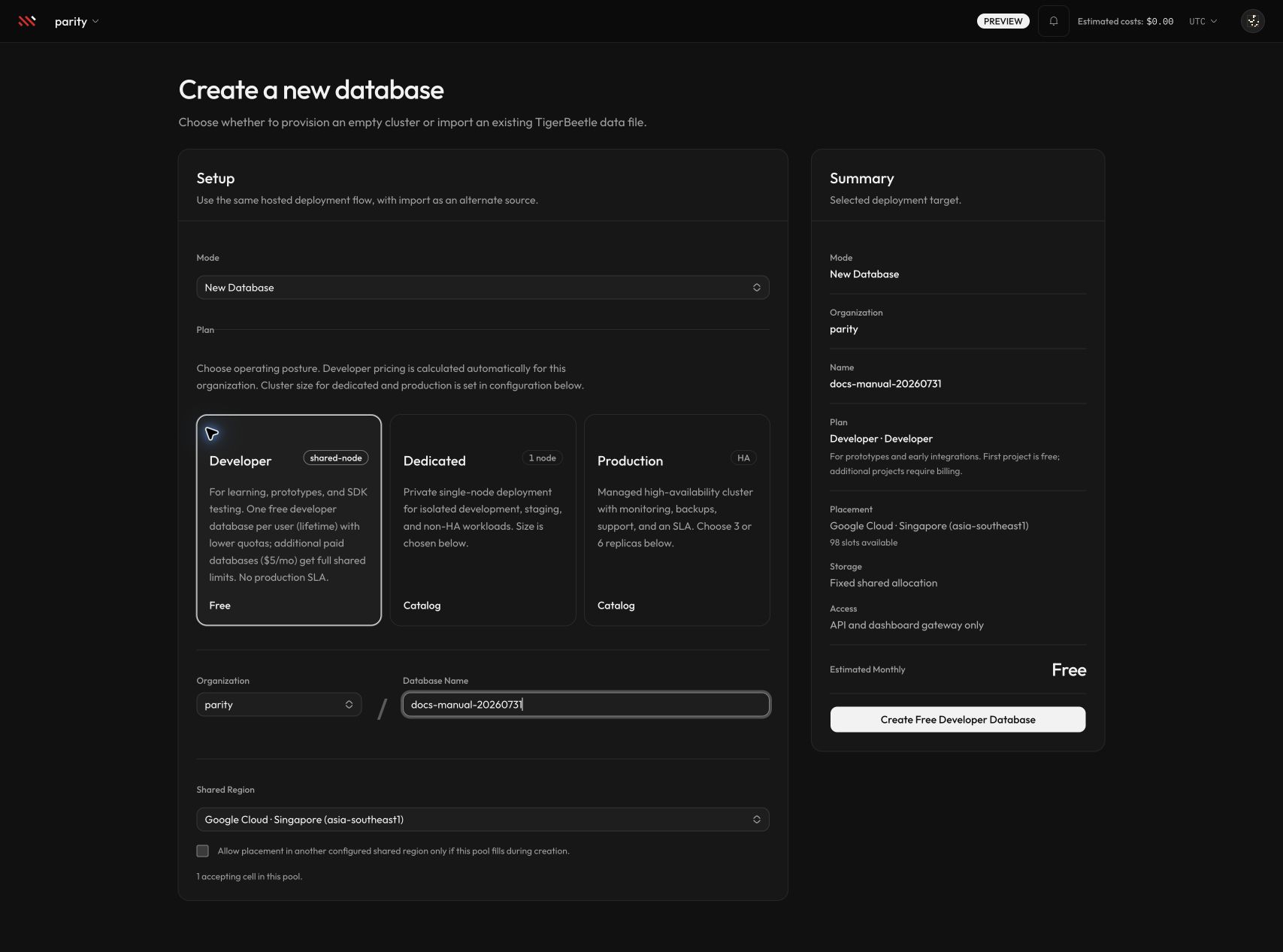
Developer creation shows the current shared-region capacity, billing posture, fixed shared allocation, and gateway-only access. Select the image to open it at full size.
- Configure placement:
- For Developer, select an available Shared Region. Enable fallback only if Parix may place the database in another configured shared region when the selected pool fills during creation.
- For Dedicated or Production, select the provider and region offered by the form. If Additional regions appears, cross-region HA is enabled for your organization and selection; otherwise it is not available.
- For Dedicated or Production, choose the offered cluster configuration, storage type and size, and cluster size. Disabled cards are not supported for the current provider/topology combination.
- Review Summary. Confirm the plan, provider or shared placement, topology, storage, cluster size, access model, and Estimated Monthly value.
- If Stripe Billing Setup Required appears, have an organization owner or administrator select the billing action and complete Stripe. Parix preserves the current create selections when the user returns.
- Select Create Free Developer Database, Create Developer Database, or Create Database, depending on the selection shown.
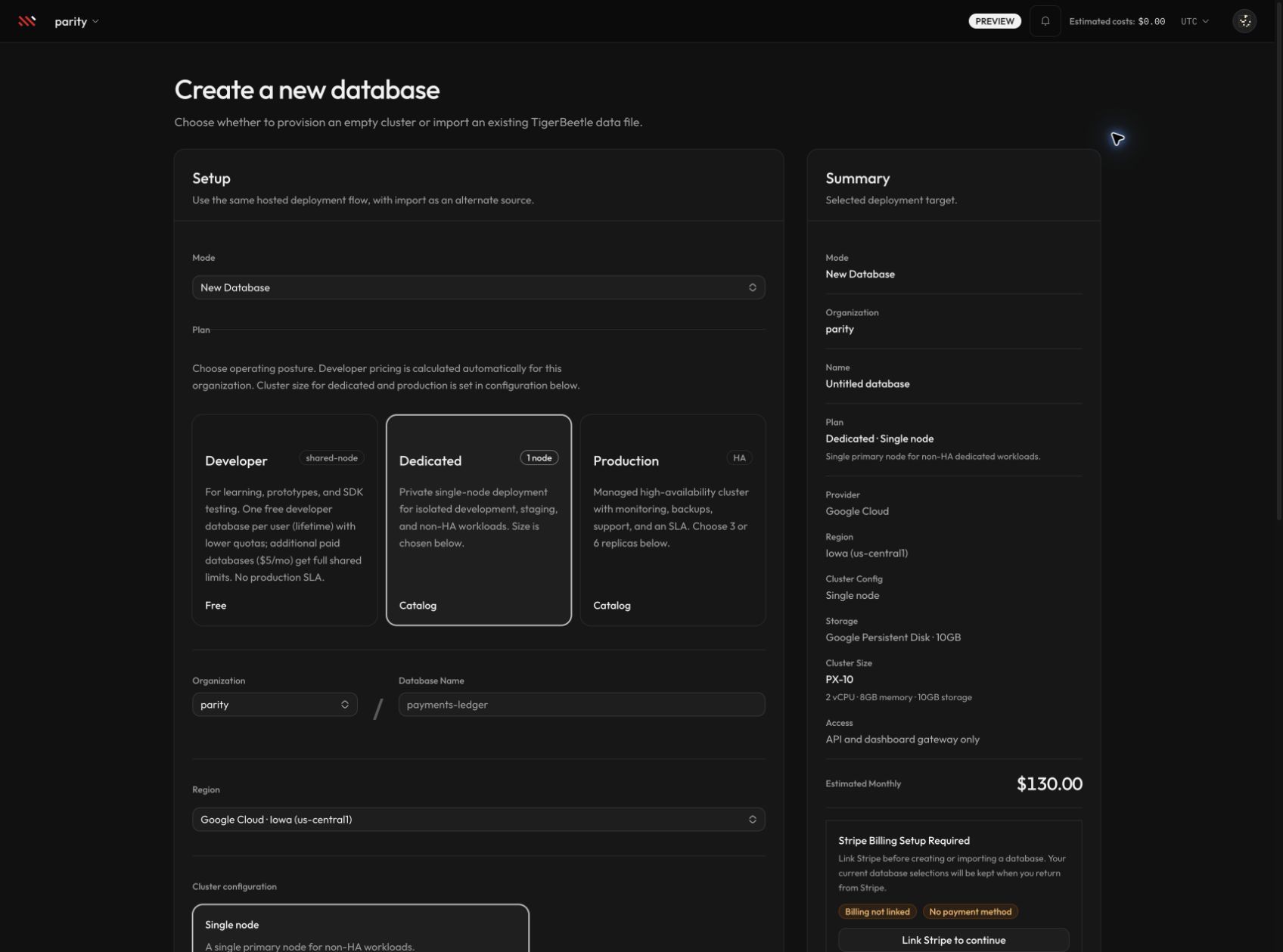
Dedicated and Production creation adds provider, topology, storage, and PX size controls. The current catalog—not the example values in this image—determines what you can select.
Expected result
Parix redirects to:
/{organizationSlug}/databases/{databaseName}A Developer database is assigned to a shared cell and normally reports Ready immediately. A Dedicated or Production database queues an asynchronous provisioning workflow and normally reports Provisioning before Ready.
Do not send application traffic until the database dashboard reports Ready. If the profile reports Error, use Try Again when it is offered and inspect the error displayed on the dashboard.
Creation warnings and limits
- All plans use the Parix gateway. Direct IPv4/IPv6 TigerBeetle connectivity is not a customer option.
- Developer placement is capacity-dependent and subject to the organization’s shared-project limit. Allowing region fallback can change the selected placement region.
- Dedicated is single-node and is not a high-availability production posture.
- Production topology is selected from the available 3- and 6-replica catalog options.
- Local NVMe is topology- and provider-dependent. The form disables unsupported combinations and warns that several post-create storage/topology changes are blocked for Local NVMe deployments.
- Cross-region HA controls are feature- and configuration-gated. Their absence means the current organization or selection cannot use them.
- A unique database row can already exist even if the later workflow cannot be queued. Read the returned dashboard message before retrying with the same name.
Developer API alternative
The shipped public API can create a Developer database with an all-databases API key. This documented automation path is intentionally limited to Developer; create Dedicated and Production databases in the dashboard so that all selected plan and topology data is applied.
First inspect the active create catalog:
export PARIX_BASE_URL="https://parix.io"

curl "$PARIX_BASE_URL/api/v1/catalog/create" \
  -H "x-api-key: $PARIX_API_KEY"
Then create the shared database:
curl -X POST "$PARIX_BASE_URL/api/v1/databases" \
  -H "content-type: application/json" \
  -H "x-api-key: $PARIX_API_KEY" \
  -H "Idempotency-Key: <unique-request-id>" \
  -d '{
    "name": "wallet-demo",
    "planCode": "developer",
    "allowRegionFallback": true
  }'
The create endpoint returns HTTP 200 both for a created database and for some billing-blocked outcomes. Check success, billing, and provisioning.status; a successful Developer response reports provisioning.status as active.
The API requires an organization-wide key. A specific-database key cannot create a database because the operation is organization-wide.
Troubleshooting
Use Provisioning and configuration when creation is blocked by billing, a duplicate name, catalog validation, shared capacity, or a failed provisioning workflow. Use API keys and authentication for API 401 or 403 responses.
Next steps
- Generate application credentials in API keys.
- Verify the gateway path in Connect to a database.
- Review plan surfaces and quotas in Plans and limits.