API keys
Generate, scope, store, rotate, and revoke Parix API keys for an organization.
Use API keys to authenticate application and automation requests to the Parix API. Keys are organization credentials, managed from global Settings and bound to the organization that is active when the key is created.
Availability and permissions
Only organization owners and administrators can generate, rotate, or delete API keys. A member who opens the page can view the current table, but a management action is rejected with Only organization owners/admins can manage API keys.
The routes are global settings routes—do not prefix them with an organization slug:
/settings/api-keys
/settings/api-keys/generate
An organization’s enabled-key quota is derived from its active database plans. When multiple plans provide a finite limit, Parix applies the lowest limit. Delete an unneeded key or review the organization’s plan mix if generation returns quota_exceeded.
Choose the database scope
The dashboard’s Scope controls which databases the key can reach. It is not a read/write permission selector.
| Scope | Use it for | Boundary |
|---|---|---|
| Specific database | One application connected to one known database | Requests for another database return 403. The key can list only its bound database (GET /api/v1/databases with db:read); it cannot create or delete databases (those require organization-wide access). |
| All databases | Organization-wide automation or a service that intentionally manages multiple databases | The key can reach databases in its organization, including organization-wide API operations. Protect it as a high-impact credential. |
Dashboard-generated keys currently receive both db:read and db:write. There is no read-only key option in this form. Use Specific database whenever organization-wide reach is unnecessary.
Generate a key
- Switch to the organization that should own the key.
- Open
/settings/api-keys. - Review the existing key table. It shows name, masked prefix, status, scope, creation time, last-used time, and actions.
- Select Generate key.
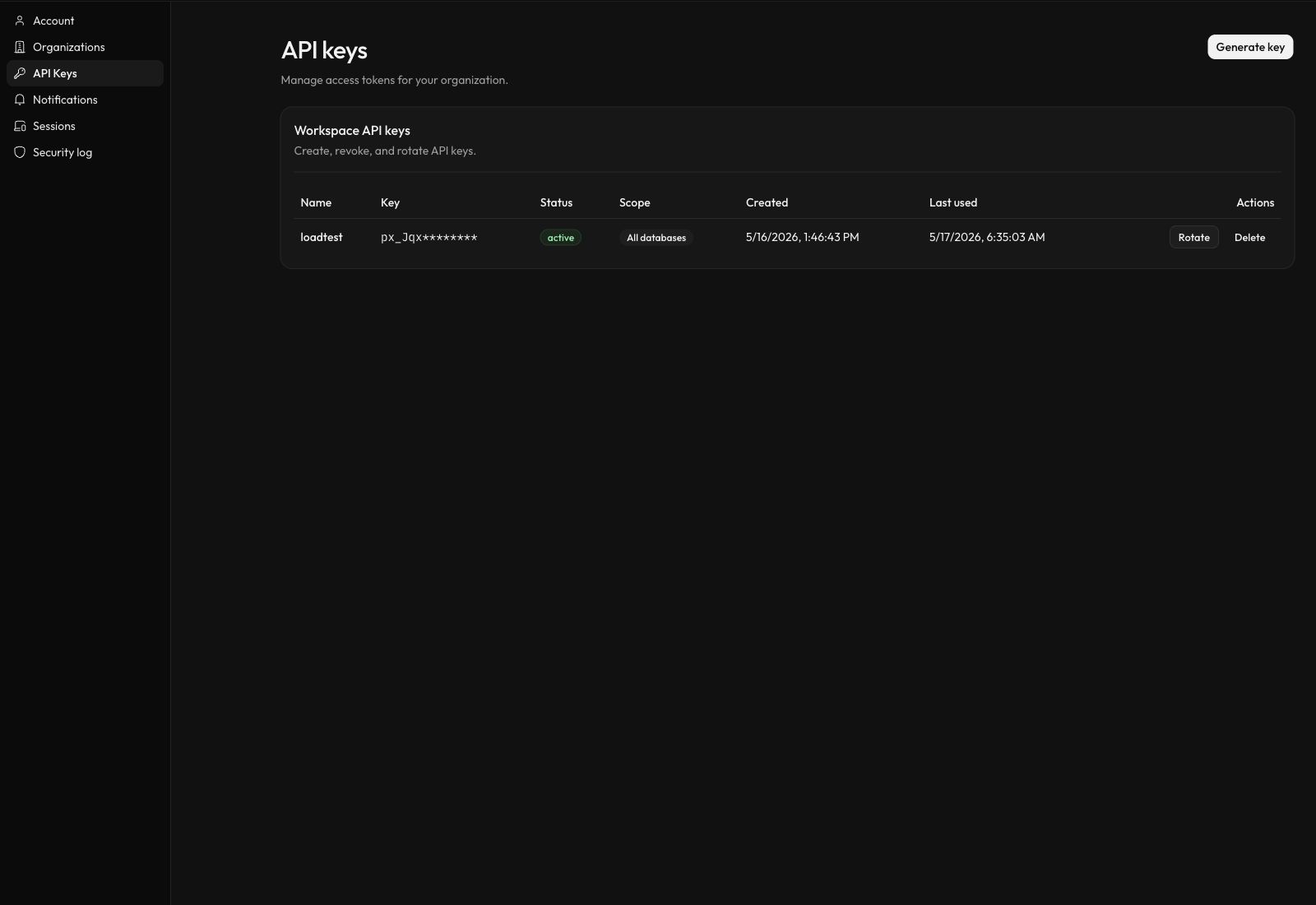
API-key settings are global, while every listed key belongs to the organization that was active when it was created.
- Enter a Key name between 2 and 40 characters. Use a name that identifies the workload or environment.
- Choose Specific database or All databases.
- If you chose Specific database, select the database from the additional field.
- Select Generate key.
- In New API key, select Copy key and store the complete
px_...value in a secret manager. The complete secret is shown only once. - Select Done to return to the table.
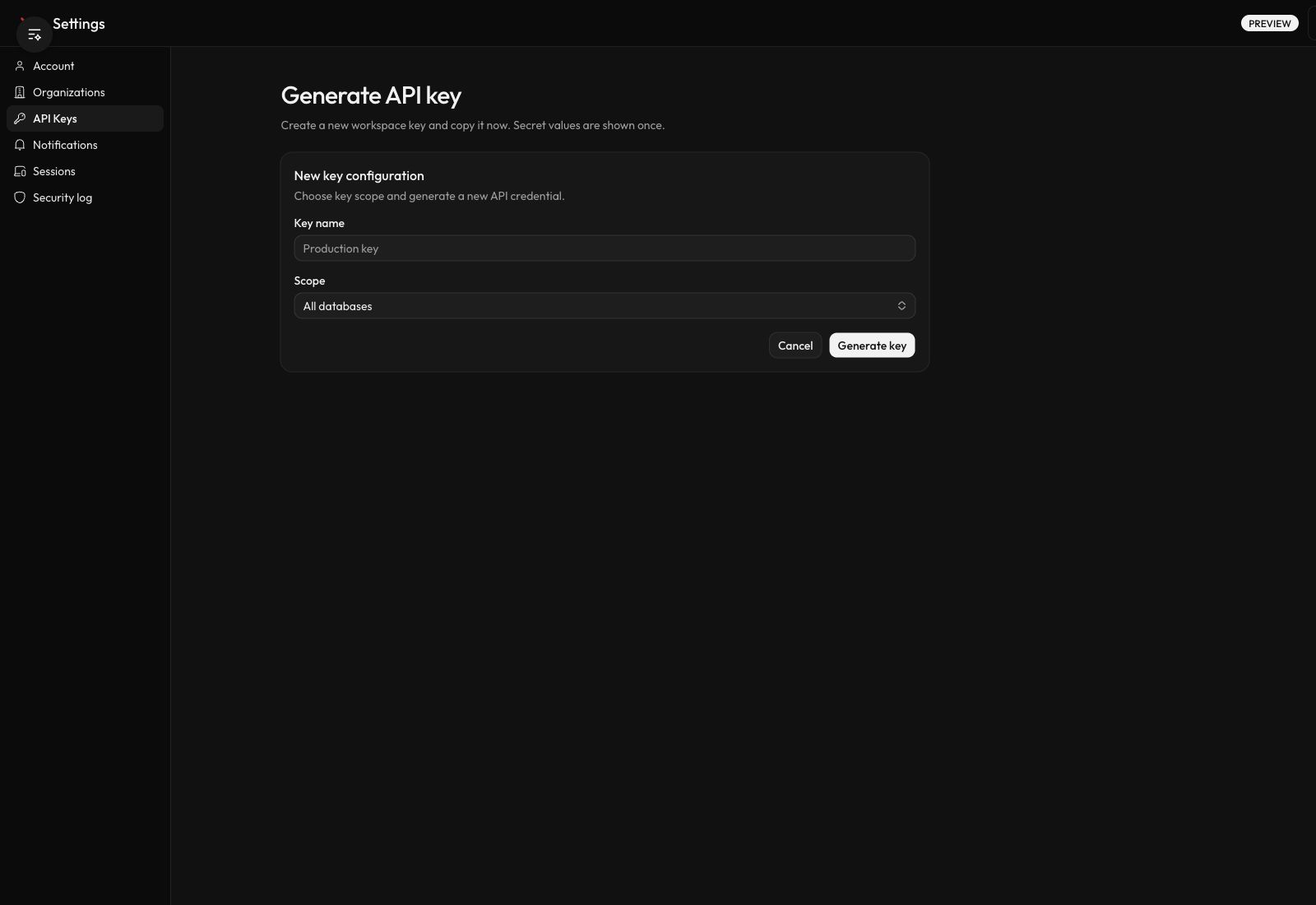
Choose database reach before generation. The generated dialog appears only after the form succeeds.
Expected result
The table contains a new row with status active and the selected scope. Verify the key against its database:
export PARIX_BASE_URL="https://parix.io"
export PARIX_API_KEY="px_..."

curl "$PARIX_BASE_URL/api/v1/databases/<database-id>" \
  -H "x-api-key: $PARIX_API_KEY"
An authorized request returns HTTP 200 and database metadata. The API also accepts a recognized API key as a bearer credential, but x-api-key is the clearest header for API-key integrations:
Authorization: Bearer px_...Rotate or delete a key
From /settings/api-keys:
- Select Rotate to disable the old key and create a replacement with the same name and database scope. Copy the replacement from the one-time dialog before selecting Done.
- Select Delete to revoke the key and remove it from the active table.
Rotation disables the old key before Parix creates the replacement. Update the workload promptly, and be prepared to generate a new key manually if rotation fails after the old key is disabled.
Security warnings
- Never put a key in source control, browser JavaScript, screenshots, tickets, or logs.
- The masked prefix in the table cannot be expanded to recover the secret.
- Regenerate or rotate immediately if the one-time secret was lost or exposed.
- A specific-database key remains a read/write key for that database.
- Removing the user who created a key from the organization causes membership verification to reject that key.
For storage and rotation guidance, see API-key security.
Troubleshooting
Use API keys and authentication for global-route 404 errors, missing secrets, 401 authentication failures, 403 database-scope failures, or wrong database identifiers.
Next steps
- Connect the scoped application in Connect to a database.
- Review the public route contract in Gateway.
- Inspect current schemas and responses in the live OpenAPI document.